
Create Your Account
Getting started with Lead Titan AI takes under two minutes. You can sign up with your email or use Google/Microsoft single sign-on.
Go to the signup page
Visit app.leadtitan.ai/leadtitan/signup or click Start Free from any page on leadtitan.ai.
Enter your details
Provide your name, email, and password. Alternatively, click Continue with Google or Continue with Microsoft for one-click signup.
Verify your email
Check your inbox for a verification link. Click it to activate your account and you'll be redirected to the app.
Free plan included: Every new account starts with 88 free credits per month (about 25 fully verified leads). No credit card required. You can upgrade anytime from Account → Billing.
Onboarding with Darwin AI
After your first login, you'll meet Darwin — your AI sales companion. Darwin walks you through a 3-step onboarding process that takes about 5 minutes.
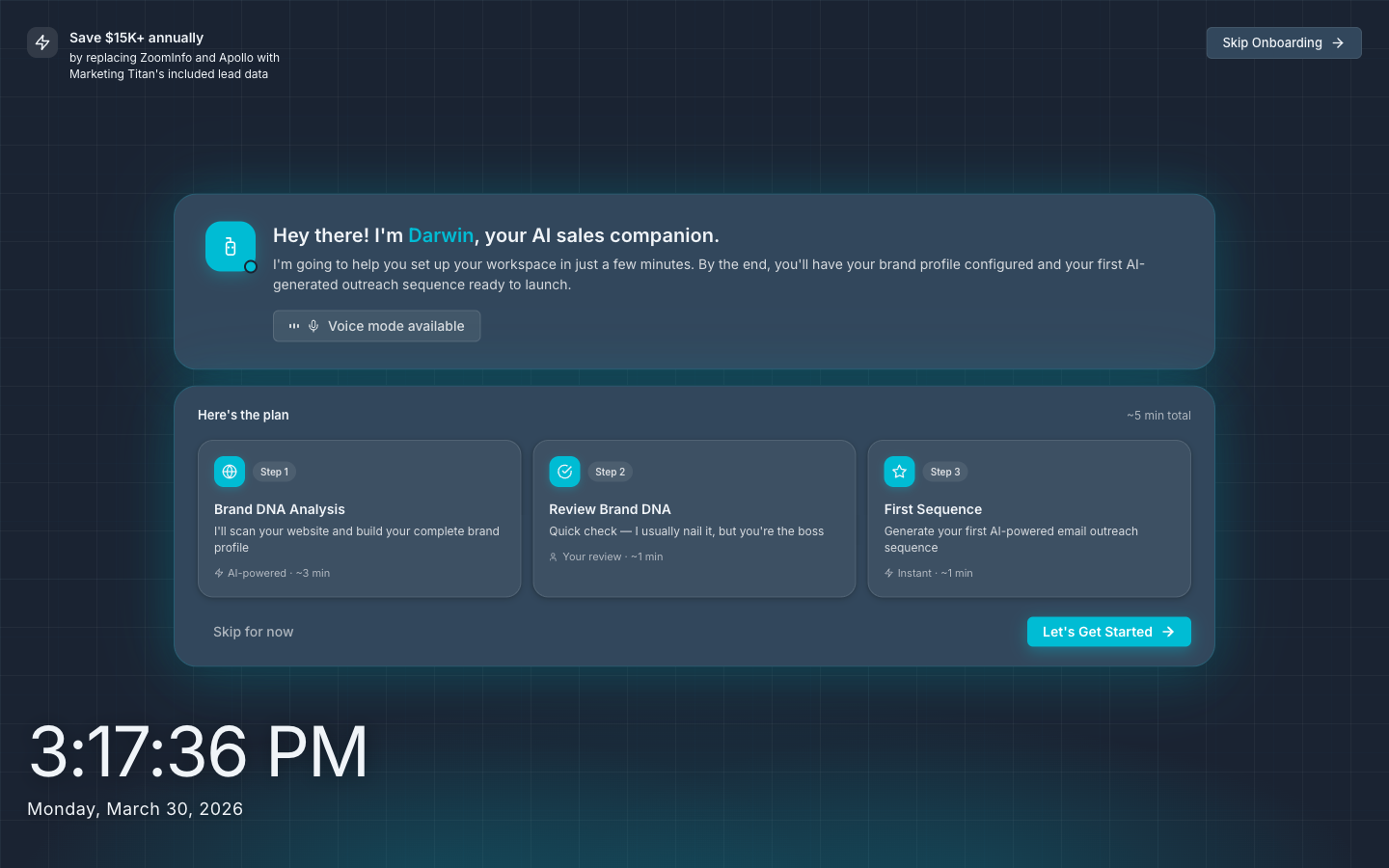
Brand DNA Analysis (~3 min)
Darwin scans your website and automatically builds your brand profile — including your industry, target audience, tone of voice, and value propositions. This data powers all AI-generated content.
Review Brand DNA (~1 min)
Review what Darwin found. You can edit any field — industries, job titles, company size filters, excluded companies, and more. These become your default search filters.
First Sequence (~1 min)
Darwin generates your first AI-powered email outreach sequence based on your brand profile. You can use it immediately or customize it later in the Sequences section.
You can skip onboarding and come back to it later by clicking Skip Onboarding in the top-right corner. Access it again anytime from the Onboarding link in the top navigation bar.
Understanding Credits
Lead Titan uses a simple credit system. Credits are reserved when you order, and leads we can't deliver are refunded automatically, so you only pay for leads we deliver.
| Action | Credits Used | What You Get |
|---|---|---|
| Generate a lead | 1 credit | Name, title, company, and basic contact info |
| Email verification | +1 credit | Mailbox-level deliverability check; only deliverable emails are delivered |
| Phone verification | +1.5 credits | Phone validated for format, carrier, and line type |
| Fully verified lead | 3.5 credits total | Lead + verified email + verified phone |
Your remaining credits are always visible in the top navigation bar. Credits refresh monthly on your billing date. Monthly credits do not roll over; credits from packs you purchase separately persist.
Plans at a Glance
| Plan | Monthly Credits | Price |
|---|---|---|
| Free | 88 | $0/mo |
| Starter | 750 | $59/mo |
| Growth | 2,500 | $169/mo |
| Pro | 10,000 | $449/mo |
See the full pricing page for details on features, add-ons, and annual discounts.
Navigating the App
Lead Titan has a clean top navigation bar with four main sections:
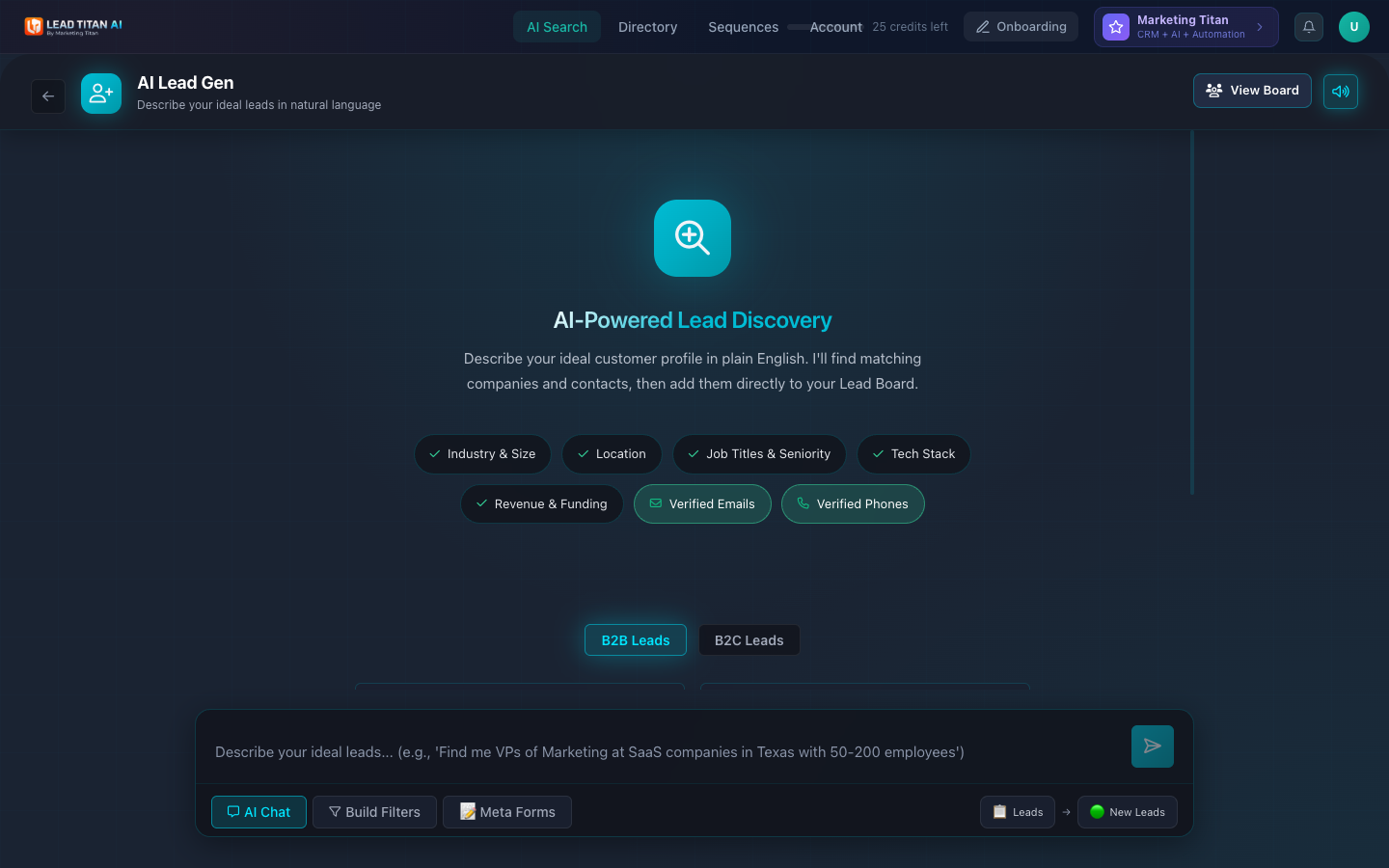
- AI Search — Your starting point. Describe your ideal customer in plain English and AI finds and verifies matching leads for your order. Strongest for local and small businesses; B2B people search is supported.
- Directory — Browse all your discovered leads (People), companies (Companies), active sequences, and email templates.
- Sequences — Create and manage multi-step email outreach sequences using the AI builder or the advanced editor.
- Account — Manage your profile, team, email sending settings, billing, brand identity, notifications, and API keys.
Additional items in the top bar:
- Credits remaining — Shows your current credit balance.
- Onboarding — Return to the guided setup at any time.
- Marketing Titan — Upgrade link to the full Marketing Titan CRM + AI + Automation platform.
- Notifications — Bell icon for lead generation alerts and system updates.
Your First Search
Once you're in the app, starting a search is as simple as typing a sentence.
Navigate to AI Search
Click AI Search in the top navigation (it's the default landing page after login).
Describe your ideal leads
Type a natural language description in the search bar. For example:
"Find me VPs of Marketing at SaaS companies in Texas with 50-200 employees"
Or click one of the pre-built search suggestions like "Personal Injury Law Firms" or "Digital Marketing Agencies".
Your search runs in the background; leads appear in AI Search/Directory as each one passes verification. Quality leads take time. First leads usually arrive within minutes, full orders take a few hours, and large or niche orders can take up to 24 hours.
Review results in Directory
Your search creates a new session in the Directory → People tab. Click into the session to see matching leads with names, emails, phone numbers, titles, and ICP fit scores.
Reveal and export
Click Reveal on any lead to spend a credit and unlock their full contact details. Use Export CSV or Export Excel to download your leads.
Search modes: In addition to AI Chat (natural language), you can also use Build Filters for structured filtering or Meta Forms for lead capture forms. Toggle between modes at the bottom of the AI Search page.
Next Steps
Now that you're set up, explore the rest of Lead Titan:
- AI Lead Discovery — Deep dive into search modes, filters, and optimization tips.
- Directory — Learn about People, Companies, search sessions, and data export.
- Email Sequences — Build multi-step email outreach campaigns with AI.
- Account Settings — Configure your team, sending domain, billing, and API keys.
- API Reference — Programmatic access for Pro plan users.